Setting up IFA3 for SEOW campaigning
Posted: Sat 08 Aug 2026 11:54 pm
With the recent move to IFA3 operations in SEOW it is helpful to be clear about what Arma 3 extensions are required. Here is a brief summary of steps. Only the first two steps require purchasing of content, the rest are free.
Step 1 - buy Arma 3
Buy the Arma 3 base game on Steam. It will download and install on your computer automatically.
Step 2 - buy Spearhead
Buy the Arma 3 Creator DLC: Spearhead 1944 on Steam. It will download and install on your computer automatically.
Step 3 - download mods
Go to your Steam Library. Click on Arma 3 and find the "Workshop" link to the right. Click on it. Locate the following Workshop mods and subscribe to each in turn:
Step 4 - enable DLC and mods
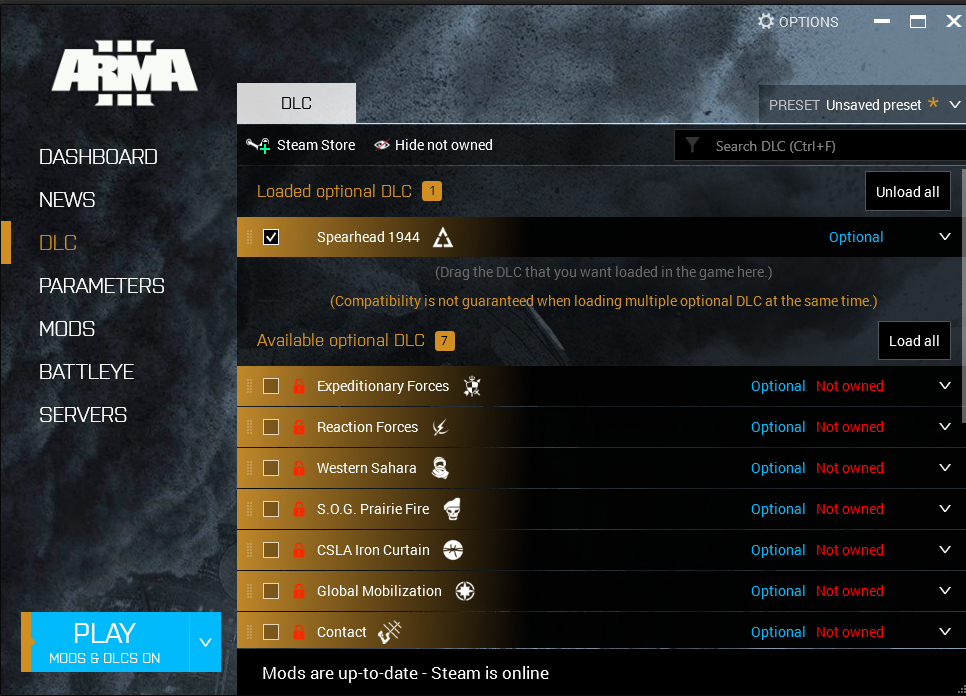
Start Arma 3 in Steam (or by using a desktop shortcut). You should see a little Arma 3 window appear with headings down the left saying Dashboard, News, DLC etc. Click on DLC and ensure that Spearhead 1944 is ticked, as in this picture:
Now go to the Mods heading on the left. Click it and see the following:
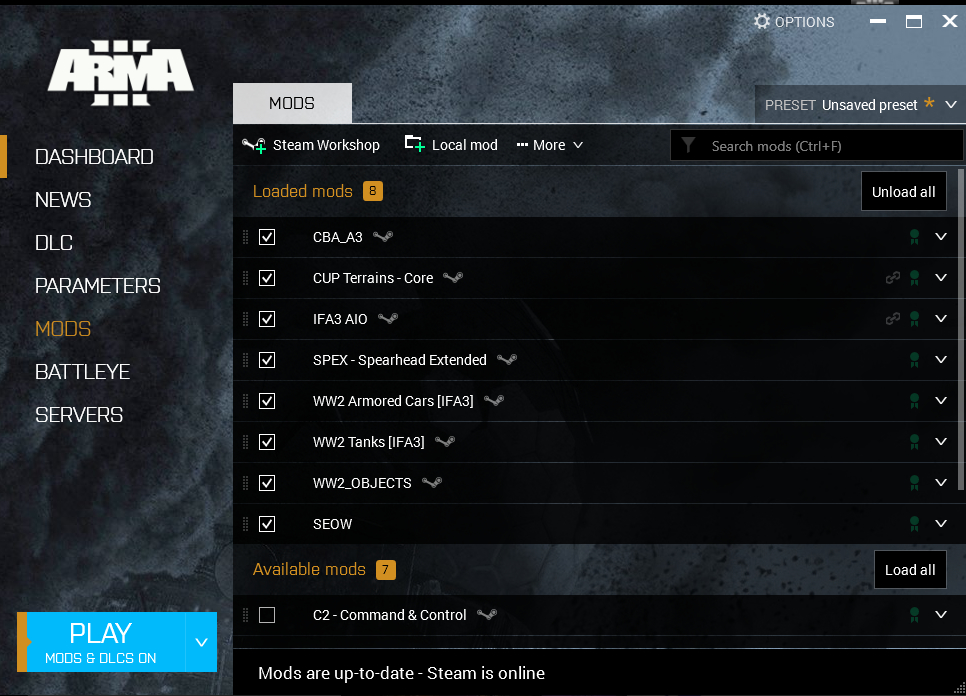
Hopefully WW2_Objects will appear automatically even though you haven't downloaded it specifically above. It may appear if you also subscribe to IFA3 Lite addon. If you have trouble finding it, let me know, there is a simple work-around. You will also notice an "SEOW" mod at the bottom. This is a special mod created by SEOW Dev Team that handles advanced sounds for SEOW operations. The next step shows how to set this SEOW mod up.
Step 5 - Set up SEOW mod
In Windows Explorer, go to your steam folder and locate the Arma 3 folder (probably in "steamapps\common"). Inside the Arma 3 folder, create a folder called "@SEOW". Inside that folder, create a folder called "AddOns". Inside that folder place the following file SEOW_sounds.pbo. This mod is crucial for several advanced SEOW in-game operations, including artillery barrages, radio broadcasts etc. Now just enable the mod in your Arma 3 Mods window. Click on the "Local Mod" link above with the green + sign. Navigate to and select the "@SEOW" folder you created. Tick the "SEOW" mod. That's done.
Step 6 - Set up in-game SEOW keycodes
The last step is to set up SEOW command keycodes. This is pretty quick. First, open Arma 3 and create your personal profile. As an example here we use "MadBilly" as your personal character name. Now close Arma 3 entirely. Now read the following page SEOW Hotkeys for IFA3 Meta Missions. Follow the instructions. You will need a text editor. In our example here we would look for "MadBilly.Arma3Profile". Copy the recommended SEOW keyUser block to the profile file, save it and restart Arma 3. You are now ready to participate in SEOW campaign missions!
Enjoy!
Step 1 - buy Arma 3
Buy the Arma 3 base game on Steam. It will download and install on your computer automatically.
Step 2 - buy Spearhead
Buy the Arma 3 Creator DLC: Spearhead 1944 on Steam. It will download and install on your computer automatically.
Step 3 - download mods
Go to your Steam Library. Click on Arma 3 and find the "Workshop" link to the right. Click on it. Locate the following Workshop mods and subscribe to each in turn:
- CBA_A3
- CUP Terrains - Core
- IFA3 AIO
- SPEX - Spearhead Extended
- WW2 Armored Cars [IFA3]
- WW2 Tanks [IFA3]
Step 4 - enable DLC and mods
Start Arma 3 in Steam (or by using a desktop shortcut). You should see a little Arma 3 window appear with headings down the left saying Dashboard, News, DLC etc. Click on DLC and ensure that Spearhead 1944 is ticked, as in this picture:
Now go to the Mods heading on the left. Click it and see the following:
Hopefully WW2_Objects will appear automatically even though you haven't downloaded it specifically above. It may appear if you also subscribe to IFA3 Lite addon. If you have trouble finding it, let me know, there is a simple work-around. You will also notice an "SEOW" mod at the bottom. This is a special mod created by SEOW Dev Team that handles advanced sounds for SEOW operations. The next step shows how to set this SEOW mod up.
Step 5 - Set up SEOW mod
In Windows Explorer, go to your steam folder and locate the Arma 3 folder (probably in "steamapps\common"). Inside the Arma 3 folder, create a folder called "@SEOW". Inside that folder, create a folder called "AddOns". Inside that folder place the following file SEOW_sounds.pbo. This mod is crucial for several advanced SEOW in-game operations, including artillery barrages, radio broadcasts etc. Now just enable the mod in your Arma 3 Mods window. Click on the "Local Mod" link above with the green + sign. Navigate to and select the "@SEOW" folder you created. Tick the "SEOW" mod. That's done.
Step 6 - Set up in-game SEOW keycodes
The last step is to set up SEOW command keycodes. This is pretty quick. First, open Arma 3 and create your personal profile. As an example here we use "MadBilly" as your personal character name. Now close Arma 3 entirely. Now read the following page SEOW Hotkeys for IFA3 Meta Missions. Follow the instructions. You will need a text editor. In our example here we would look for "MadBilly.Arma3Profile". Copy the recommended SEOW keyUser block to the profile file, save it and restart Arma 3. You are now ready to participate in SEOW campaign missions!
Enjoy!